
Simple Setup Process
Install on HighLevel.
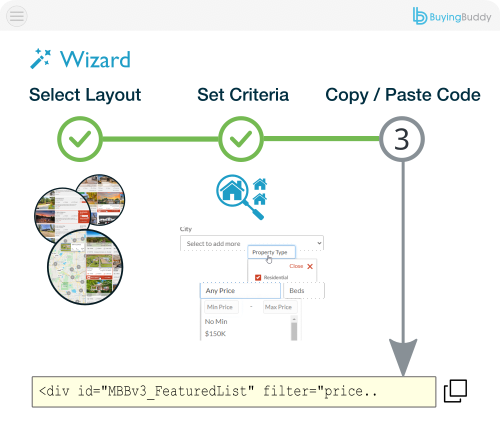
Add widget codes easily.
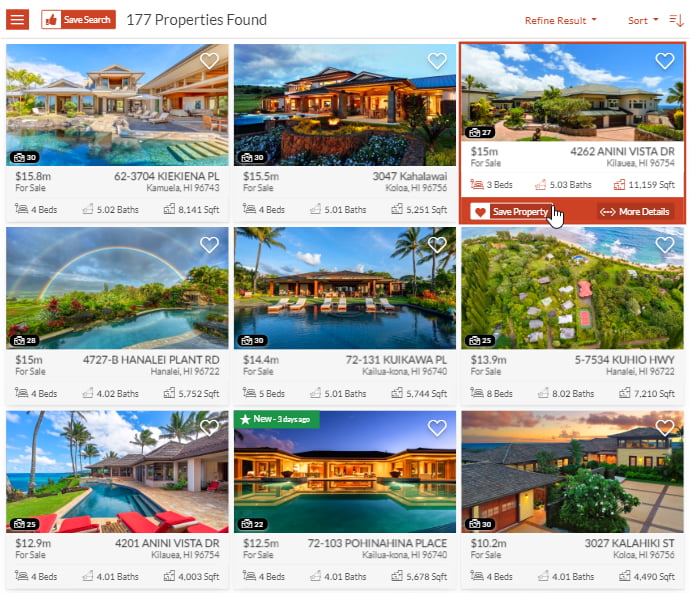
Buying Buddy delivers perfect, seamless display of MLS listings and IDX functions in your HighLevel pages.
Works with both classic HighLevel websites and the new HighLevel AI Studio.
Place property search and listings naturally within your content.
Keep visitors engaged with no iframes or subdomain redirects.
Install on HighLevel.
Add widget codes easily.

Show properties throughout your HighLevel website.

Works on classic HighLevel sites
and new AI Studio builds.
Buying Buddy's HighLevel IDX plugin incorporates MLS search capabilities, property listings, lead capture tools, and additional IDX features into your HighLevel platform.
Our HighLevel IDX solution displays all MLS data and IDX functionality directly within your HighLevel real estate website, maintaining your domain identity.
Easy-to-use widget codes allow you to insert IDX components directly into your HighLevel page content.



HighLevel AI Studio lets you build a website just by describing what you want. Buying Buddy fits right into that workflow: paste our ready-made AI Studio setup prompt into the builder and it adds your property search results, property details pages and the required MLS disclaimer for you — then offers to add a property search form.
You get the same MLS data, IDX widgets and lead capture that power a classic HighLevel website — now on HighLevel AI Studio sites too. Every listing displays on your own domain, with no iframes and no subdomain redirects.
Order HighLevel IDX Now
Every piece of MLS and IDX content appears directly within your HighLevel real estate website pages and domain. The Buying Buddy IDX solution for HighLevel never uses iFrames or subdomains, ensuring all visitors stay on your website!

Yes. Buying Buddy works with both classic HighLevel websites and the new HighLevel AI Studio.
HighLevel AI Studio lets you build a website just by describing what you want. To add IDX, you simply paste the ready-made Buying Buddy AI Studio setup prompt (from your dashboard) into the AI Studio builder. It adds your Search Results and Property Details pages, includes the required MLS disclaimer, and offers to add a property search form for you.
You get the same MLS search, property displays, IDX widgets and lead capture that power a classic HighLevel website. Everything displays on your own domain, with no iframes and no subdomain redirects.
Adding MLS search and listings to a HighLevel AI Studio site takes just a few steps:
The prompt is pre-filled with your account details, so there is no code to write.
See the demo now.
No. Buying Buddy never uses iframes or subdomains on HighLevel. All MLS search and property content is embedded directly within your HighLevel pages and stays on your own domain.
Because the content is part of your page, every property is presented on your own domain - helping keep visitors on your website.
Yes. Lead capture is built in to the Buying Buddy widgets and is fully integrated with the Buying Buddy Real Estate CRM. Property searches, property views and inquiries on your HighLevel site are tracked and available in the CRM for follow-up and automated marketing.
No, you don't need any API credentials, tokens or keys from the MLS. We handle all the data aspects entirely. All you need to do is add Buying Buddy to your HighLevel site and place the widgets.
An IDX license agreement and approval will be required from your MLS to show live MLS data on your website. This is a standard process, and we will assist you with it. Until your MLS approves the IDX license, your site will display data from our Demonstration MLS, then switch automatically to your live MLS once approved.

See More IDX Widgets

Fully Integrated

Order now!